Mesh Bot
Your AI team for everyday work.
Hand off the work. You stay in charge.
Give each bot a job, the tools it needs and clear rules. It does the work, asks you before anything risky, and you can undo what it changed. Everything runs on your Mac, with the AI you choose.
Free. For macOS. Use an API key, a model on your own computer, or a coding agent you already use: Claude Code, Codex or Hermes.
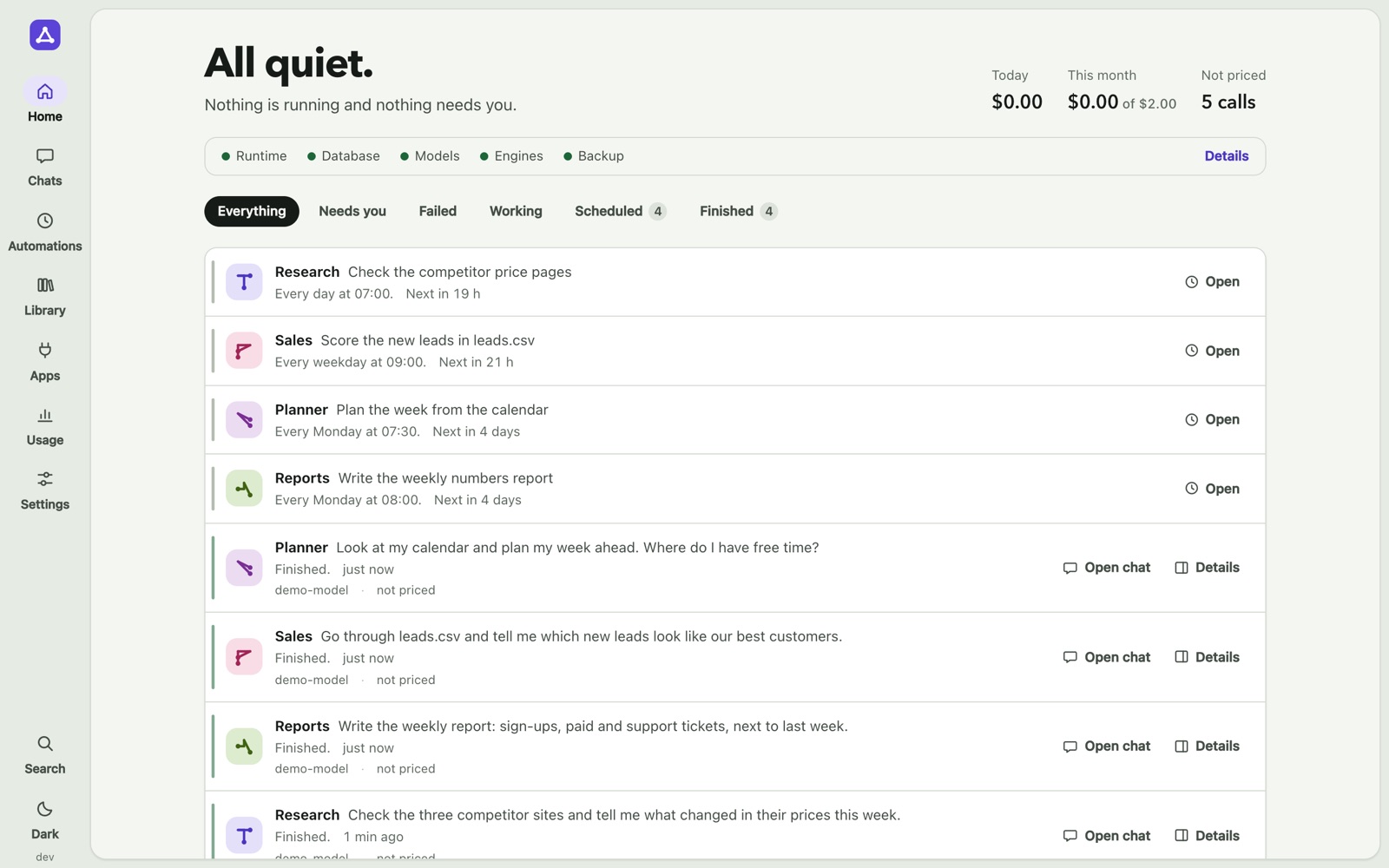
Three steps to hand off a job.
You do not need to know how AI works. You tell a bot what the job is. Mesh Bot does the rest and shows you what happened.
- 1
Make a bot.
Give it a name, a job and rules in your own words. Or ask the main bot, Mesh, to make one for you. You see it first, and you can edit it.
- 2
Give it tools.
Connect the apps it may use: your Calendar, Reminders and Contacts on the Mac, and apps that you sign in to. Choose the folders it may work in.
- 3
Let it work.
Ask in the chat, or put the job on a schedule. The bot does the work and asks before a risky step. You read the result, and you can undo file changes.
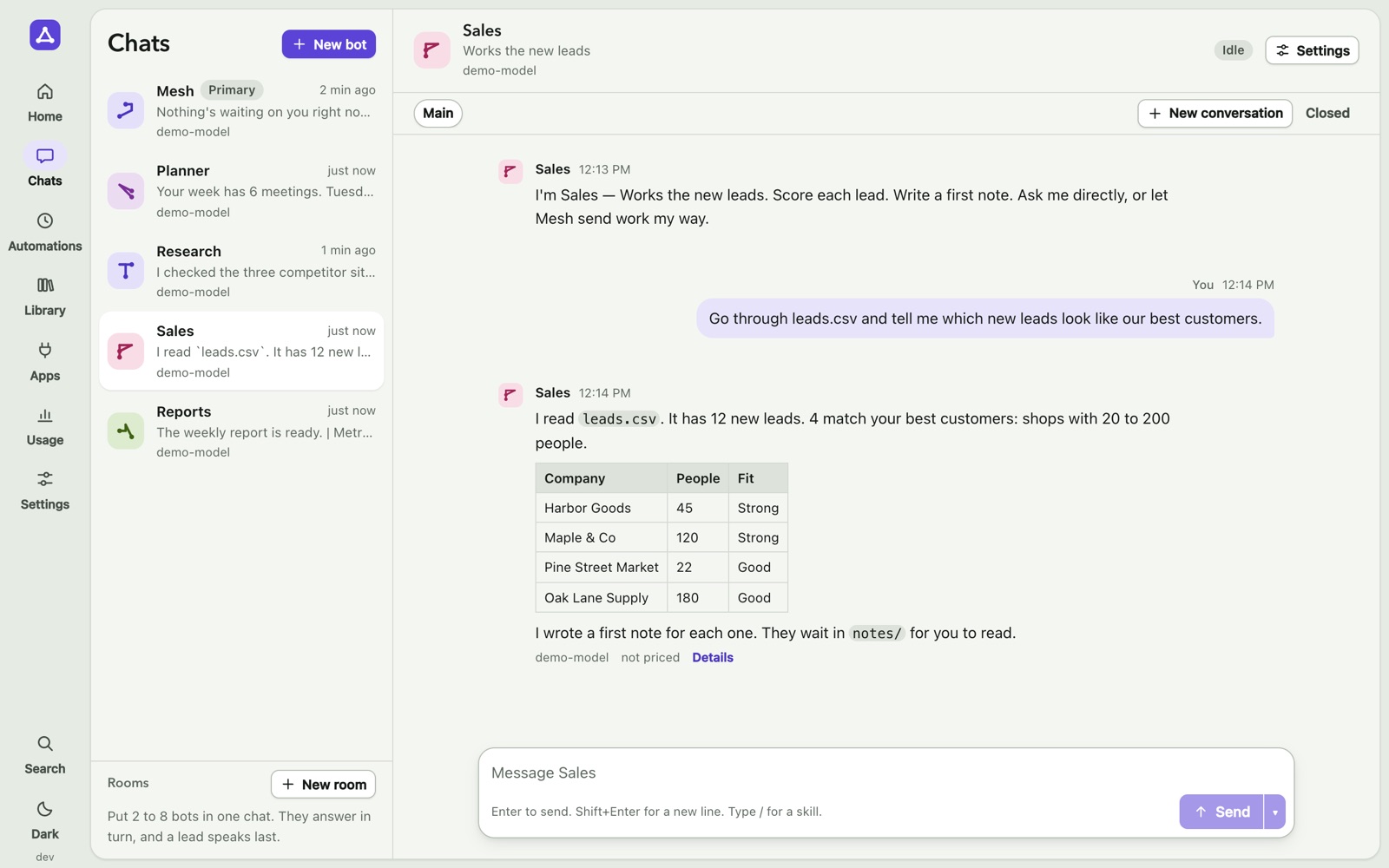
One main bot that sends the work.
Mesh, the main bot, answers you itself or hands the whole job to the one bot whose job it is. Each bot has its own chat, its own memory and its own model. A bot’s card says which jobs to send it and which not to. If Mesh picks the wrong bot, tap “Wrong bot?”: the job goes to the right one, and Mesh remembers. The bot that gets a job also gets the last few messages of your chat, so no detail is lost.
It remembers what matters.
A bot’s memory is a set of plain files that you can read and edit. It can search its own past chats. Changes to memory have a history and can be undone.
Skills you write once.
A skill is a set of steps in a file, for example “the weekly report”. Type / in the chat to use one.
What your bots can do.
Each part below is in the app today. The screens show sample data.
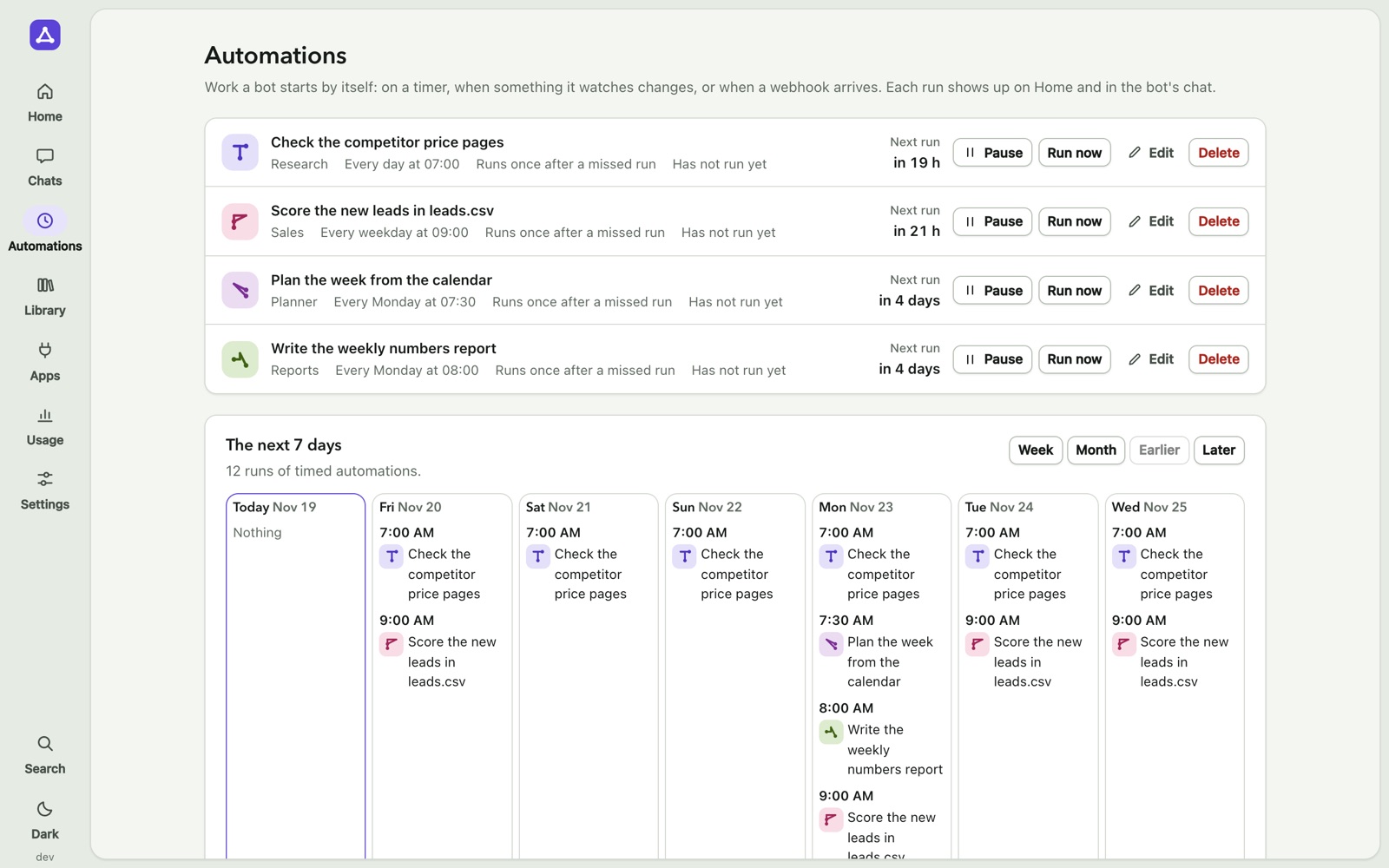
Work on a schedule.
Every day at 7, every Monday, every weekday. A job that was missed while the Mac slept runs once when it wakes. A slow job does not pile up: while its last run is still going, the next time is skipped and written down. Try a job once first, then schedule it from the chat.
Work when something happens.
A bot can start when a file or a page changes, or when a webhook arrives. Each run shows up on Home and in the bot’s chat.
Rooms for a team.
Put 2 to 8 bots in one chat. They answer in turn, and a lead speaks last. A room has its own cost limit.
Your bots on your phone.
Connect a Telegram bot to a Mesh bot. Ask from your phone and get the answer there. A bot can also write to you first.
Try on a copy first.
A bot can do a job on a copy of its folder. You see the files it changed, then apply or throw away. Up to three bots can try the same job, so you can compare.
A brief when you come back.
Home tells you what happened since you were last there, in a few lines. You can also get a daily brief at a set time.
Apps, with one sign-in.
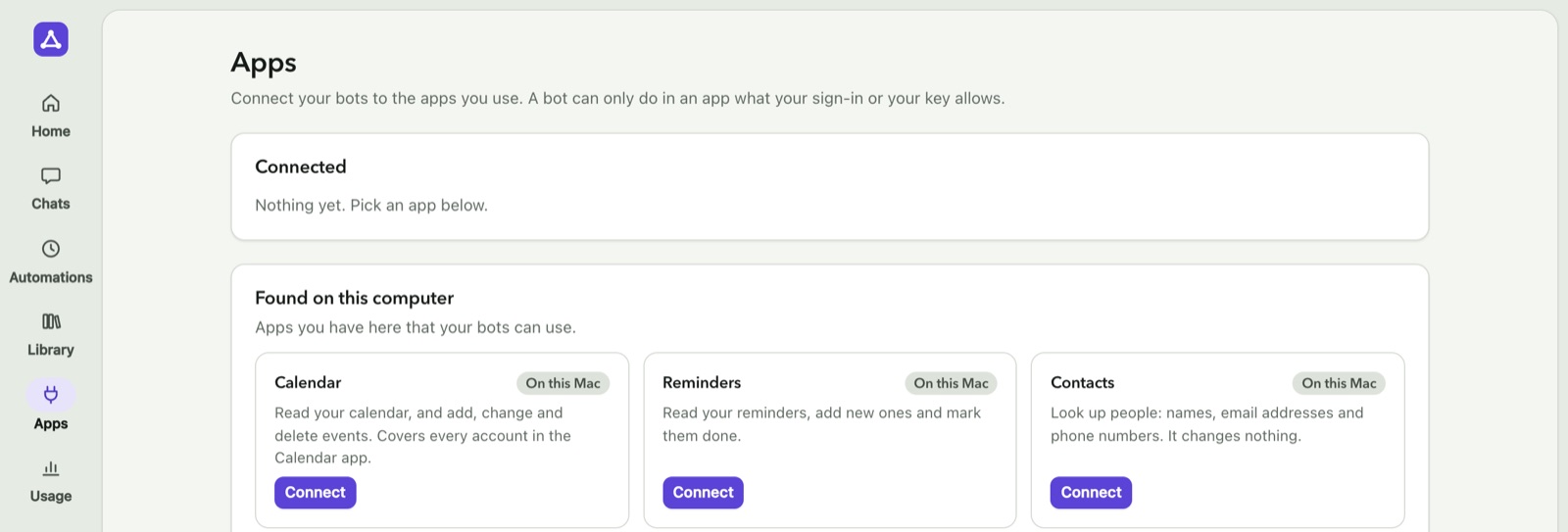
Calendar, Reminders and Contacts on your Mac connect with one click. macOS asks you first.
The catalog has about 100 more apps, for example Notion, Linear, Jira and Airtable. You sign in on the app’s own page. A bot can only do what your sign-in allows, and a send always asks.
The AI you already have.
Use a key from Anthropic, OpenAI, OpenRouter, Google, xAI, DeepSeek, Mistral or Groq. Or a model on your own computer, such as Ollama. Or a coding agent that you already use and pay for: Claude Code, Codex or Hermes. Each bot can use a different one, with a backup. A bot that runs on Claude Code or Codex works with the team like any other bot: it can hand off a job and ask for a check, and Mesh asks you only when it matters.
Other AI apps can ask your bots.
Mesh Bot can act as a tool server, so other AI apps on your Mac can hand work to your bots. It also has a command line, mesh.
You stay in charge.
A bot that can do real work can also make real mistakes. So Mesh Bot asks, records and undoes.
It asks first.
It asks when it matters.
Before a bot sends anything or acts outside its own folders, you see a card with Allow and Deny. You pick how often it asks: ask each time, ask when it matters, accept edits, or auto. You can set a rule for each tool.
It asks before the same thing goes out twice.
A message, an app's send or a form on a web page that already went out in the last 7 days asks you first. A scheduled job that repeats its own send on its next run does not ask: that is its job.
A stop in the middle is safe.
If Mesh stops while a step runs, it does not repeat a send by itself: it asks you whether it went out. A step that failed is tried again from where it was, not from the start. Six failure tests check this on every change of the app.
You see what it did.
A receipt for each job.
Under each finished job: what it made, what waits for you, and what the AI cost. Open it for the details: each tool, the web pages read, the tokens and the approvals.
You see what it costs.
Each answer shows its model and its cost. Set a monthly budget. A call with no known price is counted apart and never guessed. You also see how many answers you kept, for each AI, and for jobs a bot handed to another bot.
A second bot can check the work.
Before an answer that matters reaches you, a bot can ask another bot to check it. The checker approves or rejects it and says why.
A Watchdog while you are away.
Every 5 to 60 minutes it looks, and it writes to you on Telegram when something needs you. It also tells you when Mesh has stopped or is closed. It uses no AI tokens, and it is off until you turn it on.
It is yours.
Undo.
Each task that changes files can be undone. Files that you changed since then are left alone.
Your data stays on your Mac.
There is no Mesh server, no account and no telemetry. Your chats go only to the AI provider or the engine that you chose.
Keys in the Keychain.
Your AI keys and app sign-ins are kept in the macOS Keychain, not in a plain file.
Backups every day.
Mesh Bot makes a backup each day and checks that it can be restored.
Mesh Bot or Mesh Helm?
Both are Mac apps for AI agents. They are made for different jobs.
Mesh Bot
Get work done.
For people and small teams who want to hand off everyday work: research, planning, reports, leads. You talk to bots in a chat. You do not need to set up an engine.
Get early accessMesh Helm
Build, run and check agents.
For developers and automation builders who run agents on scheduled jobs, on Hermes Agent or on Mesh. Trial runs, run checks, the Night Brake, costs by job, and one list of what needs you.
See Mesh HelmQuestions.
Short answers. Each one is true for the app as it is today.
Which AI can my bots use?
A key from Anthropic, OpenAI, OpenRouter, Google, xAI, DeepSeek, Mistral or Groq. A model on your own computer, such as Ollama, or any server that speaks the OpenAI format. Or Claude Code, Codex or Hermes, if you have it installed and signed in. Each bot can use a different one.
Do I pay for the AI as well?
Yes, to your provider, as you do now. A model on your own computer costs nothing. Mesh Bot shows the cost of each answer.
Do my bots work when my Mac is off?
No. Mesh Bot runs on your Mac. A scheduled job that was missed while the Mac slept runs once when it wakes.
Which apps can it connect to?
Calendar, Reminders and Contacts on your Mac, GitHub with a key, and about 100 apps that you sign in to, such as Notion and Linear. Gmail, Google Drive, Microsoft 365 and Slack are not in the list yet.
Do I need many bots?
No. Start with Mesh alone: it does most jobs itself. When you ask for the same kind of job again and again, Mesh suggests a bot for it, and makes it only when you say yes.
Will there be ready-made jobs?
Yes: job packs. A pack is one finished job, installed in one go: a bot, its skills and a form to fill in. Everything it makes is a draft for you to review. The first one, for real estate agents, writes the marketing texts for a new listing. It opens first to a small closed test.
Is there a phone app?
No. You can reach each bot from your phone through Telegram.
Which operating systems?
macOS. Windows and Linux are planned.
What does it cost?
Mesh Bot is free. You bring your own AI key and pay your AI provider directly. Leave your email address below and you get one message when the Mac app is ready.
Is it made by OpenAI, Anthropic or Nous Research?
No. Mesh Bot is an independent product. It works with the AI services and the coding agents that you choose.